A gallery usually gets most of its orders in the first few days. After that it goes quiet — parents meant to order, got busy, and forgot. A little nudge with a reason to come back is often all it takes, and until now there was no easy way to give one.
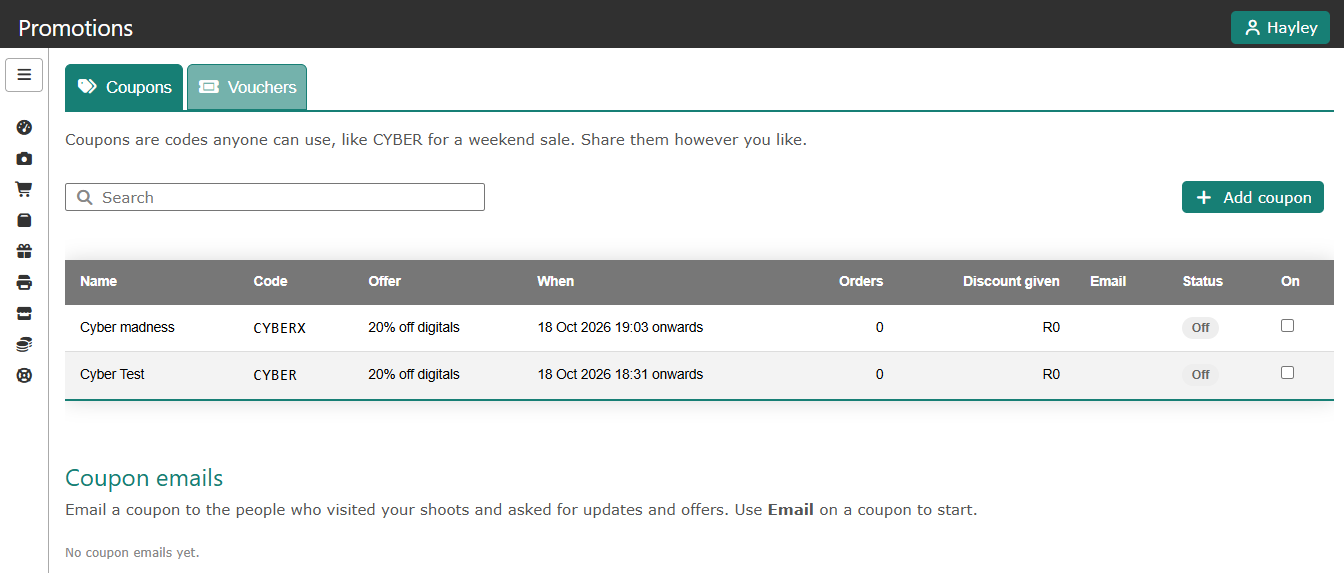
So we have built one. You will find a new Promotions page in your left-hand menu, where you can create your own discount codes, decide exactly what they give, and even email them to the people who visited your galleries.
Coupons and vouchers
There are two kinds of code, each with its own tab.
A coupon is a code you choose yourself, something easy to remember like SPRING or CYBER. Lots of customers can use it, which makes it ideal for a campaign — a weekend special, a last chance before the cut-off date, or a thank-you to a school.
A voucher is a one-off code that we generate for you, and it can only be used once. Give it to a particular person — a competition winner, a parent whose order went wrong, or a gift for a loyal client — and we can email it to them for you.
You decide what it gives
A code can take a percentage off, take a Rand amount off, or give free items. You can point it at the whole order, only digitals, only printed products, or one particular product or package. So “10% off everything”, “R50 off prints” and “a free digital with every order” are all just a few clicks.
You can then add whatever rules you need: the dates it runs between, how many orders can use it, how many times each customer can use it, a minimum order value, and the most it can ever take off. A code can cover all your shoots, including new ones, or only the shoots you choose.
The discount comes off your share of the order, so before you save, the page shows you what the code could cost you. We will warn you if something looks expensive, but the choice is always yours.
How your customers use it
Customers type the code at checkout and see the discount straight away, before they pay. The code box only appears when one of your codes can be used on that order, so customers on other shoots are not left wondering where to find one. The discount also shows on the order confirmation email and on your orders pages, so you can always see which code was used.
Email a coupon to your gallery visitors
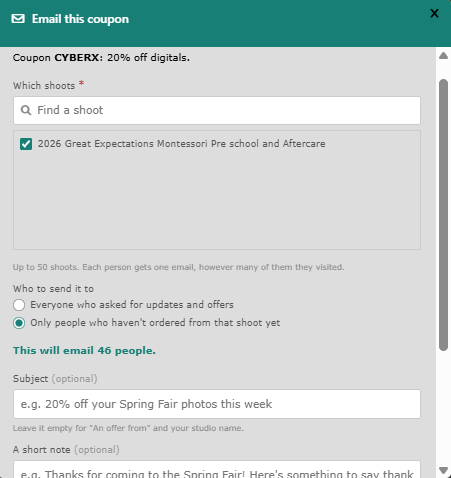
This is the part we are most excited about. When parents and clients open your gallery they can tick a box asking for updates and offers about that shoot. Press Email next to a coupon, choose the shoots, and we will send it to everyone who asked — or only to the people who have not ordered yet, which is usually the group you most want to reach.
Add your own subject and a short note, and the email goes out under your studio's name. When customers reply, it comes straight to you. Every email carries an unsubscribe link, and anyone who unticked the box or unsubscribes is never emailed. You can follow each send on the page as it goes out.
Getting started
Open Promotions from your menu, press Add coupon, and try something simple first — a small discount on one shoot for a week is a good way to see how your customers respond.
As always, if you try it out and something does not fit the way you work, we would love to hear about it — get in touch and let us know.